Globe
Telecom is raffling off one gadget every month as an incentive for its
customers to actively support the company’s Project 1 Phone electronic waste
recycling campaign.
September winner Noel TimTim (middle) receives his iPad Air from Gina Alcantara, Retail Manager of the Globe Store in Dumaguete (3rd from right). Together with them are Store shop specialists (from L-R): Rafael De Leon, Mia Crisanee Tan, Rhecelyn Nicolas, Grace Abitona, and Genelotte Baguio.
Project 1 Phone aims to recover
and recycle e-wastes specifically mobile phones and portable devices as well as
their chargers and batteries to promote proper disposal and to educate the
people about the benefits of recycling.
Proceeds from the program will be added to the funds for 40 schools
which Globe is building in Aklan to serve schoolchildren displaced by Typhoon
Haiyan a year ago.
Hewlett-Packard (HP) recently
announced a new channel initiative that will stimulate growth and
expand revenue opportunities for channel partners in Asia Pacific and
Japan. The new ‘Think Big’ Initiative is a joint investment program that
provides qualified distributors with access to HP training,
demonstration centers, sales and marketing support to pursue growth
markets and win more business across storage, servers and networking.
To
meet enterprise and SMB customer demands, channel partners need new
ways to deliver solutions that help modernize infrastructures, tackle
growing data and embrace emerging computing models such as cloud. The
Think Big initiative allows partners to provide the support their
customers need to optimize their technology infrastructures for greater
business flexibility, with HP’s backing.
In a Philippine first, Globe announces a major expansion of its current 4G footprint by becoming the first carrier in the Philippines to launch the commercial roll out of 4G mobile technology. This rollout, the first phase of which utilizes the global standard HSPA+ or Evolved High-Speed Packet Access, will complement Globe Telecom’s existing 4G WiMAX (Worldwide Interoperability for Microwave Access) network. The rollout of Globe 4G mobile network will provide its subscribers high speed broadband access with the added convenience of full mobility.
To date, Globe 4G mobile technology has been deployed covering sites across Metro Manila, which includes Marikina, Quezon City, Makati, Pasay, Las Pinas, Taguig and the City of Manila. By end-2011, Globe expects to increase its 4G presence dramatically with continued expansion planned into 2012.
Ernest Cu, President and CEO of Globe Telecom said, “Globe is again pioneering innovation in the Philippines. With the uptake in broadband both on mobile and through other devices, customers want faster broadband in more places. Globe is continuously looking for ways to improve our network infrastructure to meet the demand for quality services. In 2009, we were the first carrier to launch 4G through our WiMax network. Today, we extend our leadership by taking 4G mobile. With our high speed broadband rollout, Globe will continue to lead in customer experience by giving our subscribers better, faster, and more reliable broadband connections on their phone, laptop, PC or tablet.”
Globe will be complementing this launch shortly through the announcement of a suite of new multimedia services, 4G devices and offers for customers to enjoy.
Globe is already the first and largest 4G network in the country. Since April 2009, Globe has aggressively pursued plans to establish its 4G footprint in the country with industry leading availability of WiMAX. As the country’s 4G pioneer, with one of the largest WiMAX deployments in Southeast Asia, Globe has already made 4G available in over 1,500 sites in nearly 60 provinces across the Philippines, covering 365 cities, including Manila, Caloocan, Cainta, Antipolo, Taytay, Plaridel, Cabanatuan, Dasmarinas, Bacoor, Imus, Tanza, Calamba, Batangas City, Cebu City, Cagayan De Oro, and Zamboanga.
About 4G and HSPA+
HSPA+, or Evolved High-Speed Packet Access,is a 4G wireless, mobile, high speedbroadband technology that allows for peak theoretical download speeds of up to 21 Mbps with upgradeability for 84Mbps. With HSPA+ technology, subscribers will experience high peak rates, lower latency, improved “always-on experience”, better multimedia upload, high-speed web browsing, and faster streaming and downloads. Under Globe HSPA+ network, subscribers are expected to enjoy browsing at an average speed of 4-6 Mbps with even faster peak speeds. HSPA+ is the chosen mobile 4G standard for other carriers globally including AT&T and T-mobile in the US.
Other technologies in the 4G category include Worldwide Interoperability for Microwave Access (WiMAX) and Long Term Evolution (LTE) as rated by the International Telecommunication Union. The ITU is the leading United Nations agency for information and communication technology issues and establishes worldwide standards for seamless global interconnection.
In November 2010, Globe also completed field trials of another 4G standard, 3GPP Long Term Evolution (commonly known as LTE) wireless technology together with the SingTel Group and NEC Corporation. The field trial verified a variety of LTE functions such as quality of service; latency and hand-over within urban areas were tested as these are required for commercial use of the technology.
For more than three years now, iPhones made a huge shift in the level of technology where humans are on. Its advent in the industry was soft that gradually became phenomenal. Its used scattered like wildfire over the world because of its uniqueness and portability.
These days iPhones are owned by almost half of the population in some countries. For a person like you who is reading this article, probably you have an iPhone of your own as well as your pals. If you do, for sure, you have tried downloading or reasearching applications to jazz up your mobile where ever you go.
Straight from recreational to business uses, applications are downloaded to satistfy your wants and needs for your phone. Iphones and itouches gained popularity worldwide perhaps because of the growing number of applications.
Iphone's App Store is overflowing with more than 100,000 offerings. When you try to google "best iphone apps" tons of lists would come down in your screen.
Many of us may not be very much oriented with the technology of iPhone (especially to those who don't own one) but there is nothing to worry about because you have all the websites in the world to visit and learn from about certain things.
Iphone Application Cafe is a website packed with iPhone application reviews, accessories, news, tips and more. Choose from a wide variety of top iphone apps and free iphone games in the site.
For those of you who don't own an iPhone, iPhoneAppCafe.com encourages you to have one by their lists of applications to have such as '5 iPhone Apps for Food Lovers', 'Best iPhone Apps for Business', '10 Cool iPhone Apps to Wow Your Girlfriend' and many more. Try to visit the website today.
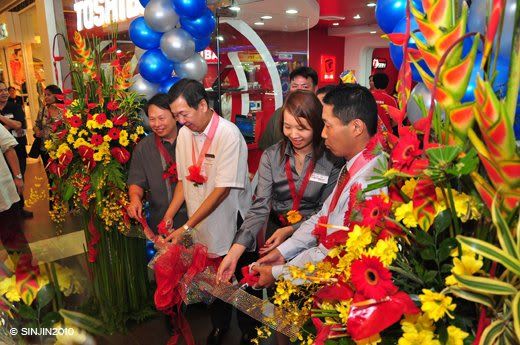
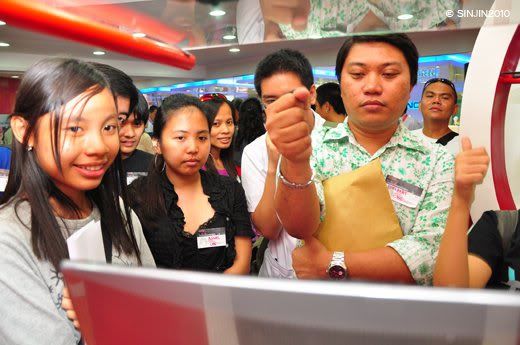
PHILIPPINES, 10 February 2010 – Toshiba Singapore Pte Ltd’s Computer Systems Division, in partnership with our mobile computing partner, Tricom Dynamics Inc,today announced the grand opening of its first Concept Store at SM City in North Reclamation Area, CebuCity. This shopToshiba Concept Store will strengthen our presence in the Visayas region and increase market share in the retail of Toshiba premium laptops.
Ms Krislyn Chia, Toshiba Singapore's Assistant Manager, Toshiba Computer Systems Division, said that with its strategic location at the 3rd level of SM City Cebu's Cyberzone, the shopToshiba Concept Store will showcase Toshiba's innovative, high quality and stylishly-designed notebook computers with several enhancements to its line of Qosmio, Satellite, Satellite Pro, Tecra, PORTÉGÉ notebook computers and not forgetting netbooks. This is in line with Toshiba being the first notebook computer maker to celebrate 25 years of notebook innovations and quality. During this celebration, Toshiba would like to engage with consumers more through rich experiences enabled by new and emergent technology.
Convenience for Customers
“The new shopToshiba Concept Store brings together the complete notebook PC line into one shop in downtown Cebu,” said Ms Juno Limjap-Sison, Tricom Marketing and Communications Officer. “The convenient location makes it easy for our customers to come and view our products.”
“We now have a shop floor to showcase what Toshiba’s world-class leading products are capable of.” TRICOM Dynamics President, Mr. Edgardo B. Isleta.
iServ – Toshiba's AuthorizedServiceCenter in SM City Cebu
Finally, a service center that is easily accessible. Customers may now have their notebooks checked while they stroll around the mall, or relax while they wait in the cool lounge area of iServ located within the shopToshiba Concept Store. This ServiceCenter is a service location fully endorsed by Toshiba Singapore Pte Ltd., where service personnel are fully certified by Toshiba and service parts used are originals supplied by Toshiba.
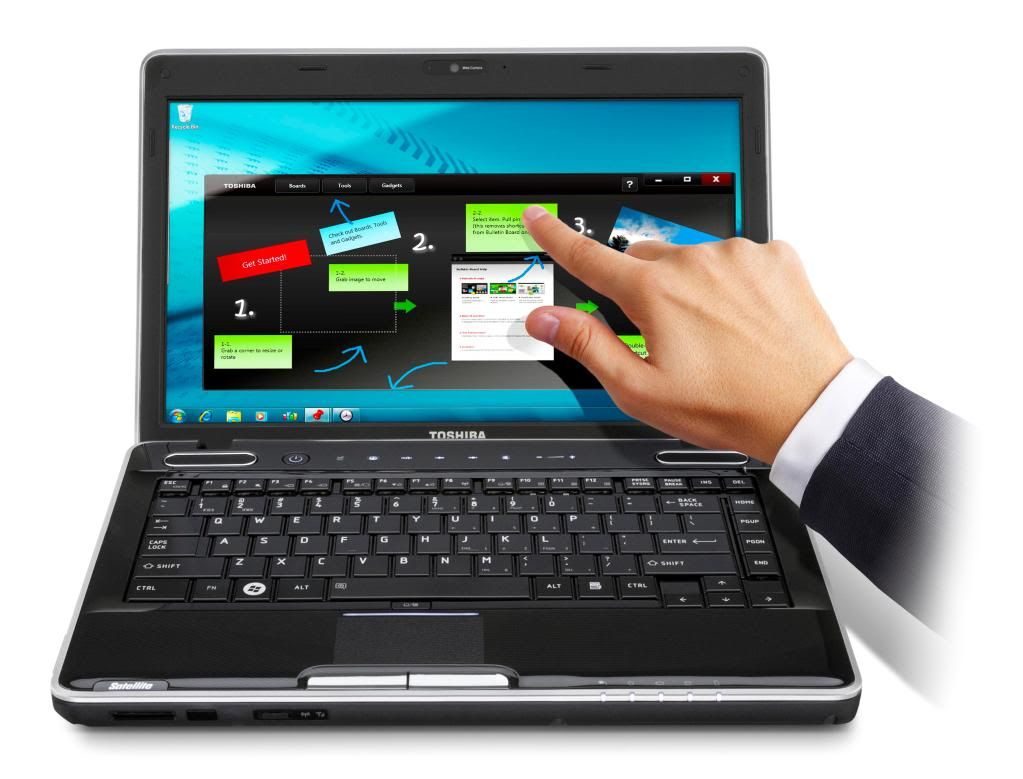
Satellite M500 (Premier Series): Empower your fingers with Multi Touch screen Technology
Toshiba strives to make the notebook PC a natural tool for improving everyday life and let you discover easy and exciting new ways to have fun and get things done with your PC. With the latest Intel’s Core™ i5-520M Processor coupled with Windows® 7 operating system, the touch-screen technology on the Satellite M500 Premier Series offers users a natural way to navigate through their digital world, enhancing the mobile computing experience.
Browse through newspapers and Web pages with ease, or flick through photo albums fast. Users can also easily sift through long lists and files with a natural swirling motion. With multitouch technology, zoom in and out by placing two fingers on the screen and moving them apart. To rotate images, press on the image with one finger and use another one to turn it in the direction you want.
The Satellite M500’s touch-screen technology also works wonderfully with Toshiba Bulletin Board™ and Toshiba ReelTime™.
Toshiba Bulletin Board™—Gives users fast access to day-to-day activities, tasks and projects in a simple and visual way. Bulletin Board makes organizing disparately stored files easier with the ability to drag and drop links, documents, photos, videos and applications into one place. Customize and organize the board by moving, rotating and resizing using gestures to fit personalized style. Bulletin Board also includes several built-in gadgets such as labels, calendars, a clock and a to-do list.
Toshiba ReelTime™—Helps users easily and quickly find files based on when they were opened with a simple visual history. With the flick of a finger, quickly scroll through automatically generated previews of documents, spreadsheets, presentations and more, filter by file type or use the calendar to go back weeks or months.
Sustainable and environment friendly As a responsible global corporate citizen, Toshiba ensures that all laptops are RoHS-compliant, effectively reducing the environmental impact by restricting the use of lead, mercury and certain other hazardous substances. Additionally, the Toshiba Power Saving Eco Utility, accessible via a dedicated button, helps to reduce power consumption. It displays current power consumption and the power savings achieved by activating Eco Mode in Watts or translated into CO2 emissions.
Toshiba remains committed to providing users around the world with innovative notebook PCs that bring new capabilities and heightened convenience, Toshiba also seeks to contribute to lower CO2 from the home by developing notebook PCs that use less energy than desktop PCs. Use of Toshiba notebook PCs will contribute to lower CO2 emission from the home by approximately 80g per day1, or almost 30kg per year2. This is half the level of CO2 emissions from desktop PCs.
About Toshiba
Established in 1875, Toshiba Corporation is a global high technology product leader with 315 major subsidiaries and affiliates worldwide. Toshiba Singapore Pte. Ltd. is a wholly owned subsidiary of Toshiba Corporation. Its Singapore-based Computer Systems Division (CSD) is the regional headquarters for South and Southeast Asia. In addition to notebooks under the Qosmio, Satellite, Satellite Pro, TECRA, PORTÉGÉ and libretto product brand names, the company also offers portable and wireless accessories for customers under the Toshiba brand name. For more information, visit the company’s website at www.pc.toshiba-asia.com.
"Before I talk about Cherry Phones, here is a short story that took place within this week that broke my heart into tiny pieces and gave me an idea to blog out about Cherry Phones..."
I have a very sad news guys and gals, I lost my cellphone. It's my brand new black-colored Nokia 1680 used for my Smart Sim. I lost it last Saturday in Parkmall or probably in the taxi I rode when I was on the way to the Mall. Hmf! I'm not that sad. I'm actually over it. All I'm worrying about for now is my father's flashdrive worth 1,200 Pesos having the terrifying memory of 8 gigabyte T_T . I actually lost it a few days ago and it really made my father so angry. The extremely bad news stated in this blog is that.... as a punishment of loosing my father's Transcend Flashdrive, he will no longer permit me to use our Canon Digital Camera! T_T [I thought I was about to die that time when he told me such punishment!!!!!!] But I accepted it- with full of pain, hurt and guilt.
SO that's it. That's the story. I'm so on with my Sun Phone right now because I no longer have with me my Smart Phone which is also the main reason that I'm planning to buy a new cellphone. Yesterday I roamed around in SM City Cebu's Cyberzone in the Northwing to see what's the latest phone. They actually told me something that is new and different.
Introducing.. the new Cherry Mobile Phone! Having the features of expensive and popular phones in town but with the cheapest prices!Part of its main lineup are dual-SIM mobile phones. Some even have features rarely found in popular and expensive phones such as- live telecasts of your favorite local-television shows. The Cherry Mobile Company has a wide range of service centers and shops around the world. Okay, enough with the general stuff about Cherry Mobile Phones. Allow me to somehow shock yourselves about their new product:
IT'S THE CHEAPEST, YET NEW, and SMALLEST one I've seen!
It is the NEW Cherry Mobile Phone P1.
This calculator-looking phone is the most unique phone I've ever seen! Unlike common phones having numerous features that slow down your phone speed of processing, it has simple functions focused on only text messaging and calling.
Here is a complete list of its features:
What's another good thing about Cherry M0bile P1 is that, it's a stand-alone phone which means, it doesn’t use add-ons to expand its functionality. It's really so small that is sizing about about three inches. It's really great! I'm actually thinking of buying three of different colors; each one to be used in three different sims as well - ahhaha! But that wouldn't probably happen today. I'm happy with my Nokia phone and Sonny Erickson. I'll hook up with the two. However, I'll be probably off to SM this coming Monday to buy my very own Cherry Mobile P1 worth P999.00 only.
Cheap, yet efficient- this Cherry Mobile P1 is a perfect gift for holidays.
I've got great news! Windows 7 is finally out! I've tried using it in our school. I actually have known this because of our updated school. Eheheh. It's good. Everyone should use it. TO rate it? Probably, 99%. Ahaha.
You can actually use Windows 7. You could always use
the trial version of it. Visit microsoft.com and see for the other details.
Honestly speaking, Windows has no official release. I don't know how, but it's official selling date in the market is set in the year 2010. Microsoft anyway is a partner of our school and I don't doubt the 'updatedness' of the institution.
HOWDY Guys! For sure some of you would be tackling in school about MS-DOS and if so, you'll be searching and stressing out some commands. Here is a complete list of ALL MS-DOS Commands and I hope I made your research less time-consuming ^__^ Uuhh.. oh yeah.. publishing this post encourage me because for sure, some of my Hardware Servicing classmates aren't able to create their homework so guys! Here are the answers! Ahahhah!. COMMENTS ARE HIGHLY APPRECIATED! xD
FOR ICIANS TESDA Classmates
Probably by this time, you want to copy all of these answers ina jiffy but Sir Raymund does not require the complete list so just copy some below like about 20 commands or so. Ehehhe. GOOD LUCK :P
ANSI.SYS — Defines functions that change display graphics, control cursor movement, and reassign keys.
APPEND — Causes MS-DOS to look in other directories when editing a file or running a command.
ARP — Displays, adds, and removes arp information from network devices
ASSIGN — Assign a drive letter to an alternate letter
ASSOC — View the file associations
AT — Schedule a time to execute commands or programs.
ATMADM — Lists connections and addresses seen by Windows ATM call manager.
ATTRIB — Display and change file attributes.
BATCH — NRecovery console command that executes a series of commands in a file.
BOOTCFG — Recovery console command that allows a user to view, modify, and rebuild the boot.ini
BREAK — Enable / disable CTRL + C feature.
CACLS — View and modify file ACL’s.
CALL — Calls a batch file from another batch file.
CD — Changes directories.
CHCP — Supplement the International keyboard and character set information.
CHDIR — Changes directories.
CHKDSK — Check the hard disk drive running FAT for errors.
CHKNTFS — Check the hard disk drive running NTFS for errors.
CHOICE — Specify a listing of multiple options within a batch file.
CLS — Clears the screen.
CMD — Opens the command interpreter.
COLOR — Easily change the foreground and background color of the MS-DOS window.
COMP — Compares files.
COMPACT — Compresses and uncompress files.
CONTROL — Open control panel icons from the MS-DOS prompt.
CONVERT Convert FAT to NTFS.
COPY — Copy one or more files to an alternate location.
CTTY — Change the computers input/output devices.
DATE — View or change the systems date.
DEBUG — Debug utility to create assembly programs to modify hardware settings.
DEFRAG — Re-arrange the hard disk drive to help with loading programs.
DEL — Deletes one or more files.
DELETE — Recovery console command that deletes a file.
DELTREE — Deletes one or more files and/or directories.
DIR — List the contents of one or more directory.
DISABLE — Recovery console command that disables Windows system services or drivers.
DISKCOMP — Compare a disk with another disk.
DISKCOPY — Copy the contents of one disk and place them on another disk.
DOSKEY — Command to view and execute commands that have been run in the past.
DOSSHELL — A GUI to help with early MS-DOS users.
DRIVPARM — Enables overwrite of original device drivers.
ECHO — Displays messages and enables and disables echo.
EDIT — View and edit files.
EDLIN — View and edit files.
EMM386 — Load extended Memory Manager.
ENABLE — Recovery console command to enable a disable service or driver.
ENDLOCAL — Stops the localization of the environment changes
enabled by the setlocal command.
ERASE — Erase files from computer.
EXPAND — Expand a Microsoft Windows file back to it’s original format.
EXIT — Exit from the command interpreter.
EXTRACT — Extract files from the Microsoft Windows cabinets.
FASTHELP — Displays a listing of MS-DOS commands and information about them
FC — Compare files.
FDISK — Utility used to create partitions on the hard disk drive.
FIND — Search for text within a file.
FINDSTR — Searches for a string of text within a file.
FIXBOOT — Writes a new boot sector.
FIXMBR — Writes a new boot record to a disk drive.
FOR — Boolean used in batch files.
FORMAT — Command to erase and prepare a disk drive.
FTP — Command to connect and operate on a FTP server.
FTYPE — Displays or modifies file types used in file extension associations.
GOTO — Moves a batch file to a specific label or location.
GRAFTABL — Show extended characters in graphics mode.
HELP — Display a listing of commands and brief explanation.
IF — Allows for batch files to perform conditional processing.
IFSHLP.SYS — 32-bit file manager.
IPCONFIG — Network command to view network adapter settings and assigned values.
KEYB — Change layout of keyboard.
LABEL — Change the label of a disk drive.
LH — Load a device driver in to high memory.
LISTSVC — Recovery console command that displays the services and drivers.
LOADFIX — Load a program above the first 64k.
LOADHIGH — Load a device driver in to high memory.
LOCK — Lock the hard disk drive.
LOGON — Recovery console command to list installations & enable administrator login.
MAP — Displays the device name of a drive.
MD — Command to create a new directory.
MEM — Display memory on system.
MKDIR — Command to create a new directory.
MODE — Modify the port or display settings.
MORE — Display one page at a time.
MOVE — Move one or more files from one directory to another DIRECTORY
MSAV — Early Microsoft Virus scanner.
MSD — Diagnostics utility.
MSCDEX — Utility used to load and provide access to the CD-ROM.
NBTSTAT — Displays protocol statistics and current TCP/IP connections using NBT
NET — Update, fix, or view the network or network settings
NETSH — Configure dynamic and static network information from MS-DOS.
NETSTAT — Display the TCP/IP network protocol statistics and information.
NLSFUNC — Load country specific information.
NSLOOKUP — Look up an IP address of a domain or host on a network.
PATH — View and modify the computers path location
PATHPING — View and locate locations of network latency
PAUSE — command used in batch files to stop the processing of a command.
PING — Test / send information to another network computer or network device
POPD — Changes to the directory or network path stored by the pushd command.
POWER — Conserve power with computer portables.
PRINT — Prints data to a printer port.
PROMPT — View and change the MS-DOS prompt.
PUSHD —Stores a directory/network path in memory so it can be returned to at any time
QBASIC — Open the QBasic.
RD — Removes an empty directory.
REN — Renames a file or directory.
RENAME — Renames a file or directory.
RMDIR — Removes an empty directory.
ROUTE — View and configure windows network route tables.
RUNAS — Enables a user to execute a program on another computer.
SCANDISK — Run the scandisk utility.
SCANREG — Scan registry and recover registry from errors.
SET — Change one variable or string to another.
SETLOCAL — Enables local environments to be changed without affecting anything else.
SHARE — Installs support for file sharing and locking capabilities.
SETVER — Change MS-DOS version to trick older MS-DOS programs.
SHIFT — Changes the position of replaceable parameters in a batch program.
SHUTDOWN — Shutdown the computer from the MS-DOS prompt.
SMARTDRV — Create a disk cache in conventional memory or extended memory.
SORT — Sorts the input and displays the output to the screen.
START — Start a separate window in Windows from the MS-DOS prompt.
SUBST — Substitute a folder on your computer for another drive letter.
SWITCHES — Remove add functions from MS-DOS.
SYS — Transfer system files to disk drive.
TELNET — Telnet to another computer / device from the prompt.
TIME — View or modify the system time.
TITLE — Change the title of their MS-DOS window.
TRACERT — Visually view a network packets route across a network.
TREE — View a visual tree of the hard disk drive.
TYPE — Display the contents of a file.
UNDELETE — Undelete a file that has been deleted.
UNFORMAT — Unformat a hard disk drive.
UNLOCK — Unlock a disk drive.
VER — Display the version information.
VERIFY — Enables or disables the feature to determine if files have been written properly.
VOL — Displays the volume information about the designated drive.
XCOPY — Copy multiple files, directories, and/or drives from one location to another.
TRUENAME — When placed before a file, will display the whole directory in which it exists TASKKILL — It allows you to kill those unneeded or locked up applications
UUhh.. oh yeah.. credits to some of my reliable sites [my sources] I don't need to cite the names :)) Thanks a lot guys!
P.S. for those of you who doesn't have any ANSWERS for question NUMBER TWO,lolx I have decided to not post 'em but I'll give you a hunch--> FILE SYSTEM is a method for storing and organizing files of the computer and the data they contain to make it easy to find and access them.
A commercial of Epson Printers followed after the tv program my youngest sister Monic and I were watching. I was fascinated and I rushed to my father's room and told him to buy one. LOLx. Now, it has been two months already after my mother and Monic accompanied me to buy the latest printer produced by Epson. It's the EPSON T10. My father actually thought of buying something better or something three-in-one like Canon, Brother, Hp and the like but I hesitated since I want the most latest on Earth XD that time.
TO make the long blogpost short, here is a link I made. Click to view the specifications of Epson T10 Inkjet Printer. Just skim the entire write-up to know what one should be expecting with this product.
A commercial of Epson Printers followed after the tv program my youngest sister, Monic and I were watching. I was fascinated and I rushed to my father's room and told him to buy one. LOLx. Now, it has been two months already after my mother and Monic accompanied me to buy the latest printer produced by Epson. It's the EPSON T10. My father actually thought of buying something better or something three-in-one like Canon, Brother, Hp and the like but I hesitated since I want the most latest on Earth XD that time.
WHAT CAN I SAY?
Okay. Here's the review. We all know or lemme say, majority of computer literate people know that inknet printers produce a movement from left to right as they print and majority also knows that Epson doesn't have any product that is 3-in-1 (before). Okay. So let us not include that as a 'negative' aspect/ character of the material.
Our newly bought Epson T10, if I were to rank if from one to ten, it would probably be eight. The reason is that Epson lives up the specifications they have posted in the site (the link I gave you above) The design is unique. I love the color and material from where it is made. Unlike the previous printer of ours, the EPSON STYLUS C45, the paper holders are alreadly in place. and is kept under the printer base (all are connected) the new T10's paper holders are not connected therefore you have to connect it and hide it to any clean place if you're not gonna use your printer. Furthermore, you could just put it in place where it should be connected to the printer. It's not actually that space consuming. You just have to keep those bondpaper holders if you want to save some space depending on where you place your computer set.
Uuhh.. what more? The black ink easily gets in the bottom line. I bet you know what I mean :P The black ink quickly runs out. I frequently do prints but I'm basing my observation with the 'normal' printing times an average pc user does. EHeheh. You know what they say, "They higher the price of the printer, the lower the price of its ink" and vice versa. Ahahha! Well, that's if for now. I better get going. I have lots of meetings to attend. Ciao for now!